.png)
Streamline Your Salesforce Case Approvals: A Mass Submit for Approval Solution ✍️
- Jessica Mills

- Dec 17, 2025
- 2 min read
In the fast-paced world of SaaS, customer service teams are on the front lines, handling hundreds of support tickets daily. When cases involve high-value actions, like refund requests, they often require mandatory managerial or finance approval before they can be processed. This standard workflow ensures financial rigor, but what happens when you have a system outage that affects dozens of customers simultaneously, leading to 50 or more refund requests? You need a solution that allows for bulk action without sacrificing control.
Step-by-Step Implementation in Salesforce
This solution leverages a simple checkbox field and a Record-Triggered Flow.
Step 1: Create a 'Submit for Approval' Checkbox Field
Create a new Checkbox field on the Case object.
Name it something clear, like ‘Submit for Approval’.
Ensure the field is added to the relevant page layouts.
Step 2: Create a Relevant List View
Create a new List View on the Case object.
Include the new ‘Submit for Approval’ checkbox field as one of the visible columns. This is where agents will initiate the bulk action.
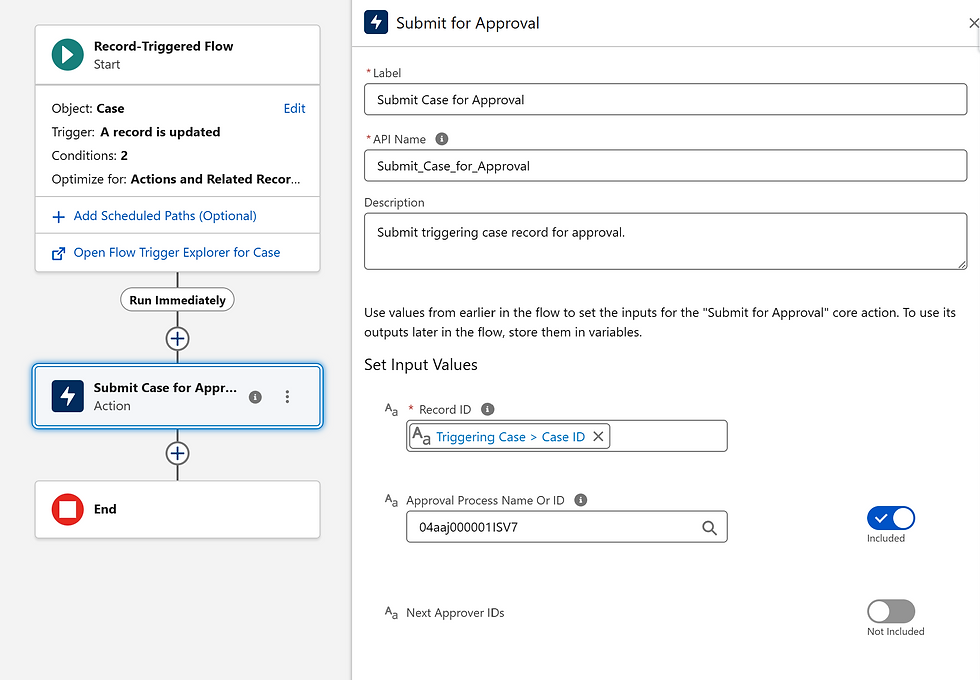
Step 3: Build the Record-Triggered Flow
Object: Case
Trigger: A record is updated.
Entry Criteria: Set the flow to run only when:
‘Submit for Approval’ is changed AND
‘Submit for Approval’ equals True

Action: Add a Submit for Approval action.
Configure this action to submit the current Case record to the associated approval process.
Putting It to the Test
The final process for your agent is simple:
The agent filters the Case List View to show all relevant refund requests (e.g., all 50 cases from the system outage).
They select all the affected records in the list view.
They click the Edit button for the ‘Submit for Approval’ field.
They check the box, select Update all selected records, and click Save.
The Record-Triggered Flow detects the change on every selected record and automatically submits them all for approval!
By combining a simple list view action with a flow, you can transform a time-consuming, manual administrative task into an efficient, bulk-processing solution. This not only streamlines your case approvals but frees up your customer service team to focus on what matters most: helping your customers.


Comments